Siemens 6ES7972-0BA12-0XA0 PROFIBUS Connector – Product Introduction
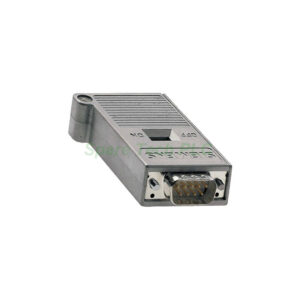
The 6ES7972-0BA12-0XA0 belongs to Siemens’ SIMATIC DP series. This PROFIBUS connector supports data transfer rates from 9.6 kbit/s up to 12 Mbit/s. It provides a secure screw-type connection for PROFIBUS cables. Additionally, it includes a 9-pin sub-D connector for network components or terminal equipment.
This model comes with a 90° cable outlet, which simplifies installation in tight control cabinets. The integrated terminating resistor includes an isolating function. You can easily activate it using the slide switch on the side.
Furthermore, the 6ES7972-0BA12-0XA0 does not include a PG socket. This design makes it suitable for applications where a programming port is unnecessary. Its compact dimensions (15.8 x 64 x 35.6 mm) save valuable space on the DIN rail.
Technical Specifications
Transfer rate: 9.6 kbit/s to 12 Mbit/s
Number of PROFIBUS cable connections: 2 (screw type)
Number of network/device connections: 1 (9-pin sub-D)
FastConnect support: No
Terminating resistor: Integrated and switchable
Enclosure material: Plastic
Locking mechanism: Screwed joint
Cable outlet angle: 90 degrees
Silicon-free: Yes
PG connection socket: No
Strain relief: Yes
Mechanical and Environmental Data
Width: 15.8 mm
Height: 64 mm
Depth: 35.6 mm
Net weight: 36 g (0.036 kg)
Operating temperature: -25 ... +60 °C
Storage temperature: -40 ... +70 °C
Transport temperature: -40 ... +70 °C
Protection class: IP20
Compliance and Environmental Information
The 6ES7972-0BA12-0XA0 complies with RoHS directive since 01.07.2010. It also meets UL approval standards.
However, note that this product contains lead monoxide (CAS-No. 1317-36-8) above 0.1% w/w. This is disclosed under REACH Article 33. The SCIP number is fcbf8893-4169-429f-981e-e2193ec1d521.
Additionally, Siemens follows WEEE (2012/19/EU) take-back obligations for this connector.
Installation Guidelines
First, ensure the PROFIBUS cable is stripped properly. Next, open the screw terminals on the 6ES7972-0BA12-0XA0. Insert the green and red wires according to the standard PROFIBUS pinout. Then, tighten the screws securely.
After that, connect the 9-pin sub-D connector to your device (PLC, drive, or HMI). Finally, set the terminating resistor switch to "ON" only if this connector sits at the physical end of the PROFIBUS segment.
For instance, when using multiple connectors in a line, only the two end devices should have the resistor enabled. All middle stations must set the switch to "OFF".
Packaging List
1 x 6ES7972-0BA12-0XA0 PROFIBUS connector
1 x Screw locking mechanism (factory assembled)
1 x User manual (multilingual)
Note: No certificate or warranty document is included in the package.
Shipping
We ship worldwide via FedEx, UPS, or DHL. The gross weight is 0.046 kg, and package dimensions are 7.80 x 6.80 x 3.20 cm.
Frequently Asked Questions (FAQ)
1. Can I use the 6ES7972-0BA12-0XA0 with a PG or laptop?
No. This model has no PG socket. Use the version with a programming port if you need online access.
2. How do I know if the terminating resistor is active?
Check the slide switch position. "ON" means the resistor is connected. "OFF" means it is bypassed.
3. What is the maximum cable length for 12 Mbit/s with this connector?
The PROFIBUS standard allows up to 100 m per segment at 12 Mbit/s. The 6ES7972-0BA12-0XA0 does not affect this limit.
4. Is this connector compatible with non-Siemens PROFIBUS devices?
Yes. The 6ES7972-0BA12-0XA0 follows the PROFIBUS RS-485 standard. It works with any compliant device.
5. Does the connector provide strain relief for the cable?
Yes. The 6ES7972-0BA12-0XA0 includes an integrated strain relief mechanism. This prevents wire pull-out.