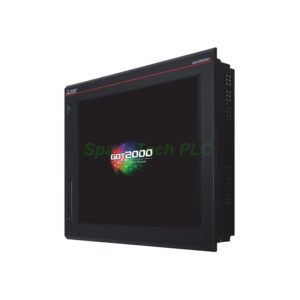
GT2712-STWD Mitsubishi GOT2000 12.1 Inch HMI
Product Introduction
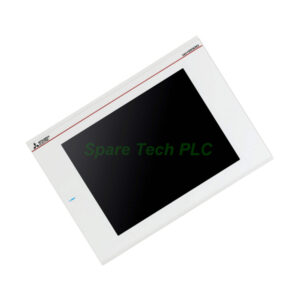
The GT2712-STWD from Mitsubishi Electric is a powerful graphic operation terminal. It belongs to the advanced GOT2000 series. This HMI features a 12.1-inch TFT color LCD with SVGA resolution (800 x 600 pixels). The display shows up to 65,536 colors for clear and vivid visuals. Its analog resistive film touch panel supports at least 1 million touches. Therefore, this model suits demanding industrial environments like production lines, packaging machines, and process control systems.
Technical Specifications
Display Parameters
Display technology: TFT color LCD
Screen size: 12.1 inches (246mm W x 184.5mm H)
Resolution: SVGA, 800 x 600 pixels
Display colors: 65,536 colors
Touch panel type: Analog resistive film
Touch panel life: 1 million touches minimum
Backlight type: LED
Backlight life: 60,000 hours at 25°C (50% brightness)
Power Requirements
Power supply voltage: 24V DC (+25%, -20%)
Power consumption: 45W maximum
Inrush current: 50A or less
Communication Interfaces
Ethernet: 1 channel, 100BASE-TX
Serial ports: RS-232 and RS-422/485
USB ports: 2 host channels (Type A), 1 device channel (Mini-B)
SD card slot: 1 slot, SDHC compliant, up to 32GB
Additionally, the GT2712-STWD supports multiple communication protocols simultaneously. You can connect to Mitsubishi PLCs, third-party controllers, and field devices. For instance, connect to an FX series PLC via RS-422, and to a network via Ethernet at the same time. Furthermore, the two USB host ports allow easy connection to a mouse, keyboard, or USB flash drive.
Mechanical & Environmental Parameters
Dimensions (WxHxD): 316 x 248 x 52 mm (panel cutout: 302 x 234 mm)
Weight: 9.07 kg (20.00 lbs)
Operating temperature: 0°C to 50°C
Storage temperature: -20°C to 60°C
Humidity: 10% to 90% RH (non-condensing)
Noise immunity: 500 Vp-p (noise voltage)
Withstand voltage: 350V AC for 1 minute
Insulation resistance: 10MΩ or more at 500V DC
Protection rating: IP67F (front panel only, when properly installed)
Installation Guide
First, prepare a panel cutout of 302mm x 234mm. Ensure the panel thickness is between 1.6mm and 6.0mm. Insert the GT2712-STWD from the front of the panel. Use the provided mounting brackets to secure it. Tighten the brackets evenly to avoid deforming the front bezel.
Next, connect 24V DC power to the power terminal block. Use twisted pair wires with 0.75 to 1.5mm² section. Double-check polarity: positive to +, negative to -. The power supply must be a Class 2 or SELV type. Then, connect communication cables. For Ethernet, use a shielded CAT5e or higher cable. For RS-422 or RS-232, use the appropriate adapter or direct cable.
Finally, insert an SD card (up to 32GB) into the SD slot for data logging or screen transfer. Connect a USB mouse or keyboard to the USB host ports if needed. The GT2712-STWD supports hot-plugging for USB and SD devices. Turn on the power and check the backlight and touch response.
Packaging List
1 x GT2712-STWD Mitsubishi GOT2000 HMI main unit
1 x Power connector (3-pin, screw type)
1 x Communication connector (RS-232/422/485)
4 x Mounting brackets with screws
1 x Installation manual (English/Japanese/Chinese)
1 x Protective sheet for screen (pre-installed)
Note: Programming software (GT Works3), communication cables, SD cards, and USB accessories are sold separately. No warranty certificate or quality certificate is included in the package.
Shipping & Delivery
We ship all products via FedEx, UPS, or DHL. Global tracking numbers are provided within 24 hours after payment. Typical delivery: 3–7 business days worldwide. Heavy items like the GT2712-STWD ship in reinforced packaging.
Frequently Asked Questions (FAQ)
1. What software is needed to program the GT2712-STWD?
You need Mitsubishi GT Works3 (version 1.100 or higher). This software supports all GOT2000 series features including screen design, recipe management, and data logging.
2. Can the GT2712-STWD connect to non-Mitsubishi PLCs?
Yes, absolutely. The GT2712-STWD supports many third-party protocols via its Ethernet and serial ports. For instance, it connects to Siemens, Omron, Allen-Bradley, and Modbus devices.
3. What is the difference between GT2712-STWD and older GT16 series?
The GT2712-STWD has a faster processor, LED backlight (longer life), more memory, and supports SDHC cards up to 32GB. The GT16 series uses CCFL backlight and smaller SD cards.
4. How do I transfer a project to this HMI?
You can transfer via Ethernet, USB device port (Mini-B), or SD card. Use GT Works3's "Transfer" function. For Ethernet, simply set the IP address of the GT2712-STWD and your PC on the same subnet.
5. What should I do if the touch screen stops responding?
First, clean the screen with a soft, dry cloth. Then, perform a touch calibration from the utility menu. If the issue persists, check the ribbon cable inside. For a replacement, contact our sales team. The GT2712-STWD touch panel is rated for 1 million touches under normal use.