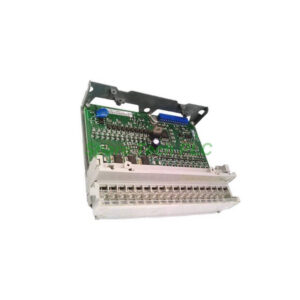
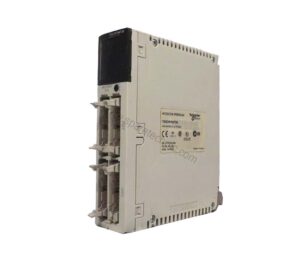
TM2DDI16DT Digital Input Module for Modicon M238 Controllers
Product Introduction
The Schneider TM2DDI16DT adds 16 discrete input points to your Modicon M238 system. All inputs operate at 24 V DC. You can connect sensors with either sink or source output types. This flexibility reduces wiring complexity in many field installations.
Additionally, the TM2DDI16DT works with other Twido and Advantys OTB systems. Its compact design saves space on a 35 mm DIN rail. The removable screw terminal block makes wiring and replacement easy. For small to medium control cabinets, this module is a practical choice.
Technical Specifications of the TM2DDI16DT
Input Characteristics
The module features 16 discrete DC inputs. Rated voltage is 24 V DC. Acceptable voltage limits range from 20.4 V to 28.8 V. Each input draws 7 mA of current. Input impedance is fixed at 3.4 kOhm.
Input Logic and Wiring
The discrete input logic supports both sink and source connections. Therefore, you can wire NPN or PNP sensors without changing hardware. The module has one common point for all 16 inputs. This simplifies the return path wiring.
Response Time
Response time is consistent for both state changes. From state 0 to state 1, the delay is 4 ms. From state 1 to state 0, the delay is also 4 ms. This speed suits most general purpose discrete sensing applications.
Isolation Details
Isolation between individual channels is not provided. However, isolation between all channels and the internal logic reaches 500 V for one minute. This protects the controller from field wiring faults. Keep this in mind when wiring sensors from different power sources.
Current Consumption
The TM2DDI16DT draws 40 mA from the 5 V DC internal supply. This measurement assumes all 16 inputs are in the state 1 condition. No external 24 V DC supply is needed for this module. Power comes entirely from the expansion bus.
Local Signaling and Indicators
Display Block
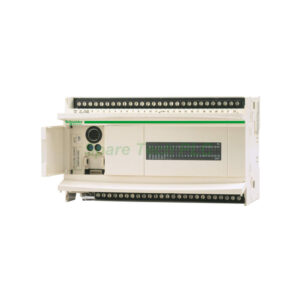
A single display block provides local signaling. This includes visual status for each input channel. The LEDs help you troubleshoot field wiring quickly. When an input is active, its corresponding LED turns on.
Physical Dimensions and Weight
Module Dimensions
Width measures only 23.5 mm. Height is 90 mm, and depth reaches 84.6 mm. This narrow width allows high density mounting on a DIN rail. You can place multiple expansion modules next to each other.
Product Weight
The module itself weighs 0.065 kg. With packaging, the gross weight is 0.196 kg. The shipping box measures 12.8 cm in length, 10.6 cm in width, and 7.4 cm in height. These compact dimensions reduce shipping costs.
Environmental and Mechanical Data
Mounting Support
Mounting requires a 35 mm symmetrical DIN rail. This is standard for industrial control cabinets. Use end clamps to secure the module on both sides. Leave some space for air circulation and wiring access.
Operating Environment
The module is rated for typical industrial environments. While specific temperature limits are not listed in this datasheet, Modicon M238 products generally operate from 0°C to 55°C. The IP20 protection rating suits clean, dry control cabinets.
Installation Guidelines for the TM2DDI16DT
Mounting Instructions
First, ensure the Modicon M238 controller is powered off. Next, clip the TM2DDI16DT onto the DIN rail. Slide it to the left until it clicks against the controller or adjacent module. Then secure the rail clip at the bottom.
Connecting to the Controller
The module connects through the expansion bus on the right side of the M238 controller. No separate ribbon cable is needed. Push the module firmly until the connectors engage. You will hear a click when properly seated.
Wiring the Inputs
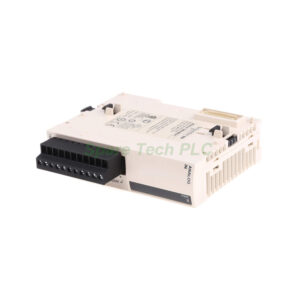
Use the removable screw terminal block for wiring. Strip 7 mm of insulation from each wire. Insert the wire into the terminal and tighten the screw to 0.5 Nm. Connect sensor signals to the input terminals. Connect the common return to the COM terminal.
Choosing Sink or Source Mode
For sink wiring (NPN sensor), connect the sensor output to the input terminal. Connect the sensor common to +24 V. For source wiring (PNP sensor), connect the sensor output to the input terminal. Connect the sensor common to 0 V. Both methods work with the TM2DDI16DT.
Compatibility Information
Range Compatibility
This module works with Modicon M238 logic controllers. Additionally, it is compatible with Twido controllers. Advantys OTB systems also support this module. However, always check firmware versions before installation.
Expansion Limits
The M238 controller supports multiple expansion modules. You can mix digital and analog modules. The total number depends on the specific controller model. Refer to your controller manual for exact limits.
Packaging List
1 x Schneider TM2DDI16DT Digital Input Module
1 x Removable screw terminal block (16 positions)
1 x Product label sheet
1 x Quick reference guide
Shipping Information
We ship worldwide using FedEx, UPS, and DHL. Tracking numbers are provided within 24 hours after dispatch. Export packaging ensures safe delivery.
Frequently Asked Questions (FAQ)
1. Can the TM2DDI16DT accept 120 V AC inputs?
No. This module accepts only 24 V DC inputs. The input voltage range is 20.4 V to 28.8 V DC. Applying AC voltage will damage the module permanently.
2. What is the difference between sink and source wiring on this module?
Sink wiring means current flows from the input terminal to the common. Source wiring means current flows from the common to the input terminal. The TM2DDI16DT accepts both. You just wire the common to +24 V for sink or to 0 V for source.
3. How many TM2DDI16DT modules can I connect to one M238 controller?
The Modicon M238 supports up to 7 expansion modules total. You can mix different types. However, the exact limit depends on the controller model and power budget. Check the 5 V DC current capacity of your controller.
4. Do I need external power for this input module?
No. The TM2DDI16DT draws all its power from the 5 V DC expansion bus. Current consumption is 40 mA when all inputs are active. No external 24 V DC connection is required for module operation.
5. Why do my input LEDs turn on even when no sensor is connected?
This usually indicates a wiring issue. Floating inputs can read as high due to electrical noise. Connect unused inputs to 0 V or use pull-down resistors. Also verify that the common terminal is properly connected to 24 V or 0 V depending on your wiring mode.