Keyence IV4-CP70 Vision Sensor Control Panel
Product Introduction
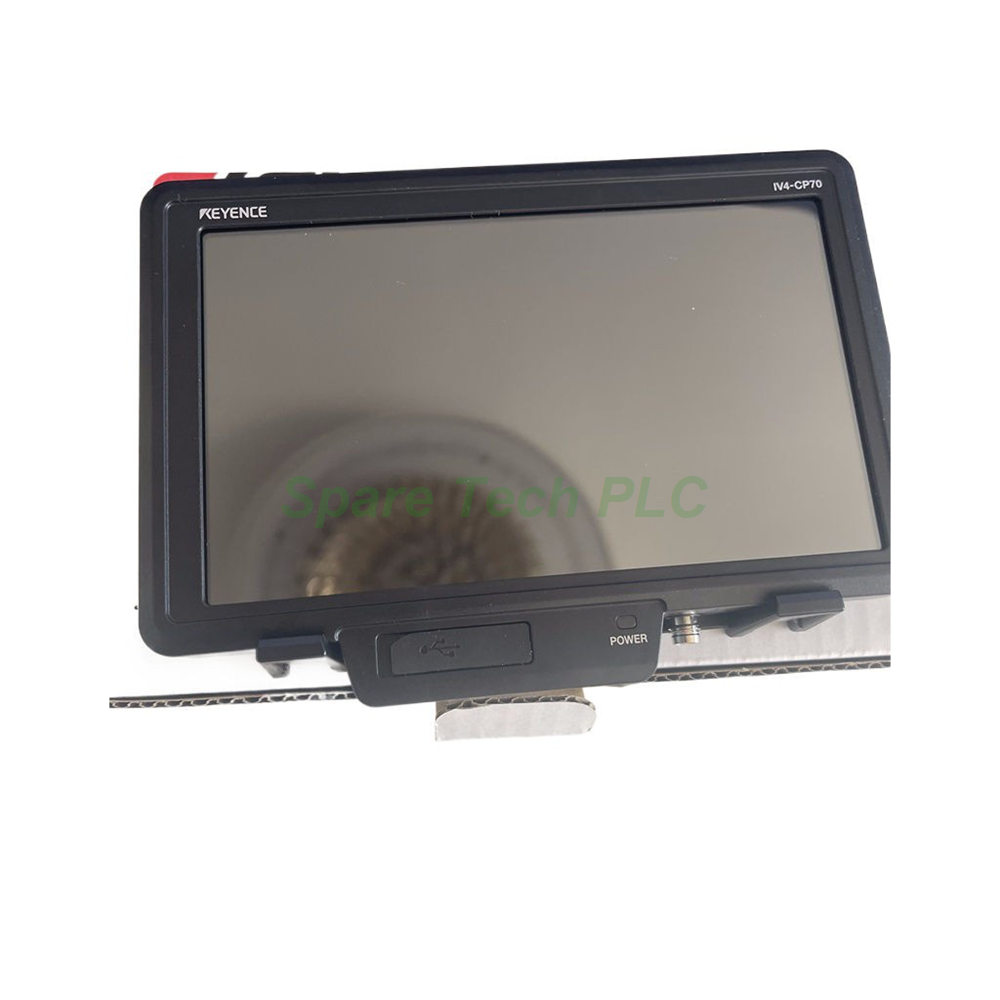
The Keyence IV4-CP70 is a dedicated 7-inch touchscreen control panel built for the IV4, IV3, IV2, and IV series vision sensors. As a central interface for machine vision setups, this panel allows operators to configure, monitor, and troubleshoot sensor heads without a separate PC. Additionally, its analog resistive touchscreen supports stylus and gloved-hand operation, which suits factory floors and production lines. The unit also runs a VNC server, enabling remote access from networked devices.
Technical Specifications
The IV4-CP70 features a 7-inch TFT color LCD with a resolution of 1024 x 600 (WSVGA). The analog resistive touch panel responds reliably to both finger and stylus input. Moreover, the white LED backlight offers an approximate lifespan of 50,000 hours at 25°C, reducing long-term maintenance needs.
For connectivity, this control panel includes an M12 8-pin X-code Ethernet connector supporting 1000BASE-T/100BASE-TX. It also provides one USB Type-A port for peripherals such as a mouse or storage device. Through the VNC server protocol, users can view and control the panel remotely over a network.
Electrical Parameters
The IV4-CP70 operates on 24 VDC +25%/-20% supply voltage. Power consumption stays at 0.9 A or less at 19.2 V, while average power consumption reaches just 6.0 W. Consequently, the panel remains energy-efficient for continuous operation. The power supply connector uses brass with nickel plating, ensuring stable electrical contact over time.
Mechanical and Environmental Parameters
This control panel is built for rugged industrial use. The case uses PC material, while the Ethernet connector combines zinc alloy, nickel plating, and LCP. Meanwhile, the USB connector cover uses EPDM, and the included stylus is made of POM.
The IV4-CP70 carries an IP40 protection rating, suitable for indoor control cabinets and protected stations. It survives drops of 1.3 m onto concrete (two times, any direction). Vibration resistance covers 10 to 500 Hz, 0.816 G²/Hz, across X, Y, and Z directions. The operating temperature range is 0 to +50°C without freezing, and humidity tolerance is 85% RH or less without condensation.
Installation Guide
First, confirm the panel location provides adequate clearance for the 7-inch display and cable routing. Next, connect the M12 8-pin X-code Ethernet cable to the vision sensor network. After that, wire the 24 VDC power supply to the dedicated connector. The wall-mounting adapter simplifies surface attachment in cabinets or on brackets.
Once powered, the panel automatically detects compatible IV series sensors on the network. Users can then assign sensor heads and begin configuration through the touchscreen. Besides local operation, the VNC server function allows engineers to connect from a PC for remote diagnostics. Finally, secure the USB cover when the port is not in use to maintain IP40 protection.
Packaging List
FAQ
Which vision sensors work with the IV4-CP70?
The IV4-CP70 supports IV4, IV3, IV2, and IV series vision sensors, making it a flexible interface across multiple Keyence platforms.
Does the IV4-CP70 support remote access?
Yes. The panel includes a VNC server, so users can view and control it remotely from a networked PC or tablet.
What is the display resolution of the IV4-CP70?
It uses a 7-inch TFT color LCD with 1024 x 600 (WSVGA) resolution and an analog resistive touch panel.
What power supply does the IV4-CP70 require?
The panel runs on 24 VDC +25%/-20% and consumes 0.9 A or less at 19.2 V, with average power consumption of 6.0 W.
Is the IV4-CP70 protected against dust and water?
The unit carries an IP40 rating, which protects against solid objects over 1 mm but not against water ingress.